
Best Singapore SIM and eSIM: Plans, Prices and Which to Buy
Singapore is the rare place where the network barely matters and the plan structure decides everything. The whole island runs standalone 5G, so coverage is not the question. What separates the options is validity, whether calls are included, and how much regional data comes with it.
| The default pick | Yesim’s 5 GB runs $11.52 for 30 days, which matches real usage. |
|---|---|
| Streaming or tethering | Airalo unlimited, $27 for seven days and $69 for thirty. |
| Adding Malaysia or Bali | a physical SIM, which bundles regional data and a local number. |
| Registration | every prepaid SIM and eSIM must be registered, with a limit of three per passport. |
| Network | the country has nationwide standalone 5G, so all four operators are fine. |
| Free WiFi | Wireless@SG is genuinely usable and logs in with a phone number. |
1. Coverage is not the question here
2. A passport-registered SIM stops after 30 days
3. Singapore SIMs come with regional data attached
4. Which eSIM to buy, and what each costs
5. The other operators
6. Where to buy at Changi
7. Check that your handset takes an eSIM
8. How much data you will actually use
9. Wireless@SG is better than most free WiFi
10. Installing and switching on
11. What fits which trip
12. The check before you fly
13. Other Singapore guides worth reading
1. Coverage is not the question here
Singapore was the first country covered end to end by standalone 5G, so no operator will let you down on signal. Singtel passed 95% nationwide standalone coverage back in 2022, the build finished across the island, and through 2026 the operators have been migrating customers from the older non-standalone setup onto it.
That removes the question that dominates SIM guides for larger countries. There is no rural gap to plan around, no operator that fades outside the capital, no mountain range to check. The island is 50 kilometres across and every operator covers it.
So the decision moves to the plan itself, and three things separate them.
| What varies | Why it matters |
|---|---|
| Validity | Anything registered to a passport stops at 30 days, and eSIM plans often run 14 |
| Calls and a local number | Physical tourist SIMs include them; data-only eSIMs do not |
| Regional data | Singapore SIMs carry Southeast Asia and Asia-Pacific allowances that most eSIMs do not |
Singapore eSIM cost calculator
Enter how long you stay and how much data you expect to use. The table shows what each provider actually charges for that trip, what you get, and how many days you end up paying for but not using.
Rows are in a fixed order by provider. That order is not a ranking.
They price on different axes. Airalo sells a fixed ladder of trip lengths alongside a grid of data caps. Yesim sells unlimited by the exact day, so a 12-day trip costs 12 days rather than a 15-day package. Saily sells a small set of data bundles with a fixed validity.
- Airalo · Network: Singtel 5G · M1 LTE
- Airalo · Speed limit on unlimited packages: Unlimited means unlimited until 3 GB in one day. After that the speed drops to 1 Mbps for the rest of that day, then resets.
- Yesim ·
- Every option here is data only. None of them gives you a local phone number, so if you need one for calls, deliveries or SMS codes, an eSIM of this kind is not the answer.
Every package and price, side by side: the full eSIM cost calculator
2. A passport-registered SIM stops after 30 days
Since 15 July 2024 a prepaid SIM registered against a foreign passport carries a maximum validity of thirty days. After that it is suspended, and there is no refund on whatever credit is left. Keeping the same number past thirty days means re-registering in person with a Singapore-issued identity card or work pass, which a visitor does not have.
This is an IMDA rule rather than an operator policy, so switching provider does not avoid it.
| Rule | Detail |
|---|---|
| Registration | Compulsory for every prepaid SIM, physical or eSIM |
| Document | Passport for visitors |
| Limit per person | Three prepaid SIMs, counted across all operators together |
| Validity on a passport | 30 days from registration, then suspended with no refund |
| Extending | Re-register in person with a Singapore IC or work pass |
For a week in Singapore none of this bites. It matters in three situations: a stay longer than a month, a trip that leaves and returns expecting the same SIM to still work, and anyone planning to top up a number kept from a previous visit. In all three the answer is to treat the SIM as disposable and buy fresh.
3. Singapore SIMs come with regional data attached
This is the part most comparisons skip, and it decides the purchase for anyone whose trip does not stop at the causeway. A Singapore tourist SIM is not only a Singapore SIM. StarHub’s published tourist plans read like this.
| Plan | Price | Data | Validity | Roaming |
|---|---|---|---|---|
| 4G Tourist | S$12 | 500 GB total: 300 local, 200 Southeast Asia, 15 Asia-Pacific | 30 days | 9 destinations |
| 5G Tourist Core | S$15 | 500 GB total: 300 local, 200 Southeast Asia, 30 Asia-Pacific | 30 days | 20 destinations |
| 5G Tourist Plus | S$30 | 700 GB total: 400 local, 300 Southeast Asia, 90 Asia-Pacific | 30 days | 20 destinations |
All three include unlimited local calls and texts plus 100 minutes of roaming calls. Read against a day trip to Johor Bahru, a few nights in Kuala Lumpur or a Bali leg, that regional allowance is the difference between one purchase and two.
4. Which eSIM to buy, and what each costs
This is where the choice actually gets made. The brands price on different structures, and that gap doubles the bill. Straight from what each publishes for Singapore:
| Brand | Pricing | Singapore rates | Worth knowing |
|---|---|---|---|
| Yesim | Capped, all 30 days | 1 GB $3.00 · 5 GB $11.52 10 GB $19.20 · 20 GB $26.40 · 30 GB $33.60 | 5G. Closest fit to what travellers actually use |
| Saily | Capped | 1 GB / 7 days $3.99 20 GB / 30 days $22.99 | NordVPN built in. “Unlimited” throttles after 5 GB a day |
| Airalo | Unlimited only | 3 days $11.50 · 5 days $18.50 · 7 days $27.00 10 days $34.50 · 15 days $48 · 30 days $69 | Runs on Singtel plus one other. No capped plans |
| Klook · KKday | Reselling local operator products | Varies by product | Carry both eSIMs and the physical SIMs that come with a local number |
Set that against the usage figures above and the answer falls out. A traveller on maps, messaging and Grab uses under 2 GB a week, which makes Yesim’s 5 GB at $11.52 for 30 days the fit, while the same money buys three days of unlimited from Airalo. Unless the trip really is three days, capped wins.
Either way an eSIM is data-only, so there is no local number. If a hotel or a restaurant holding a booking may need to call you, go to the physical SIM in the next section.
5. The other operators
Singapore has four operators. Singtel, StarHub and M1 all sell at Changi; Simba sells only in town. Their prices sit close enough together that cost alone rarely decides it.
What decides it are the three fields above: validity, calls, and regional data. StarHub is the one that publishes the regional allowance plan by plan, which is why the tables here use its figures. Other operators also sell plans with roaming attached, but the terms have to be checked in store or in the app.
Simba is the cheapest per gigabyte. It is also not sold at the airport, so you leave Changi without data and find a shop in town. Reasonable on a repeat visit, poor on a first one.
6. Where to buy at Changi
Singtel, StarHub and M1 all sell at Changi, and the counters sit in the arrival halls of Terminals 1, 2, 3 and 4. StarHub is handled through Prosegur and StarHub Changi Recommends counters. Ordering online in advance for airport pickup is supported and saves queueing behind a full flight.
Bring the passport you entered on. Registration happens at the counter and takes a couple of minutes.
| Route | How it goes |
|---|---|
| eSIM bought before flying | Installed at home, live the moment you land, no counter at all |
| Physical SIM, pre-ordered | Collect at a Changi counter, still tied to counter hours |
| Physical SIM, bought on arrival | Widest choice of plans, but you queue after a long flight |
| Simba in town | Cheapest, and you arrive with no data |
7. Check that your handset takes an eSIM
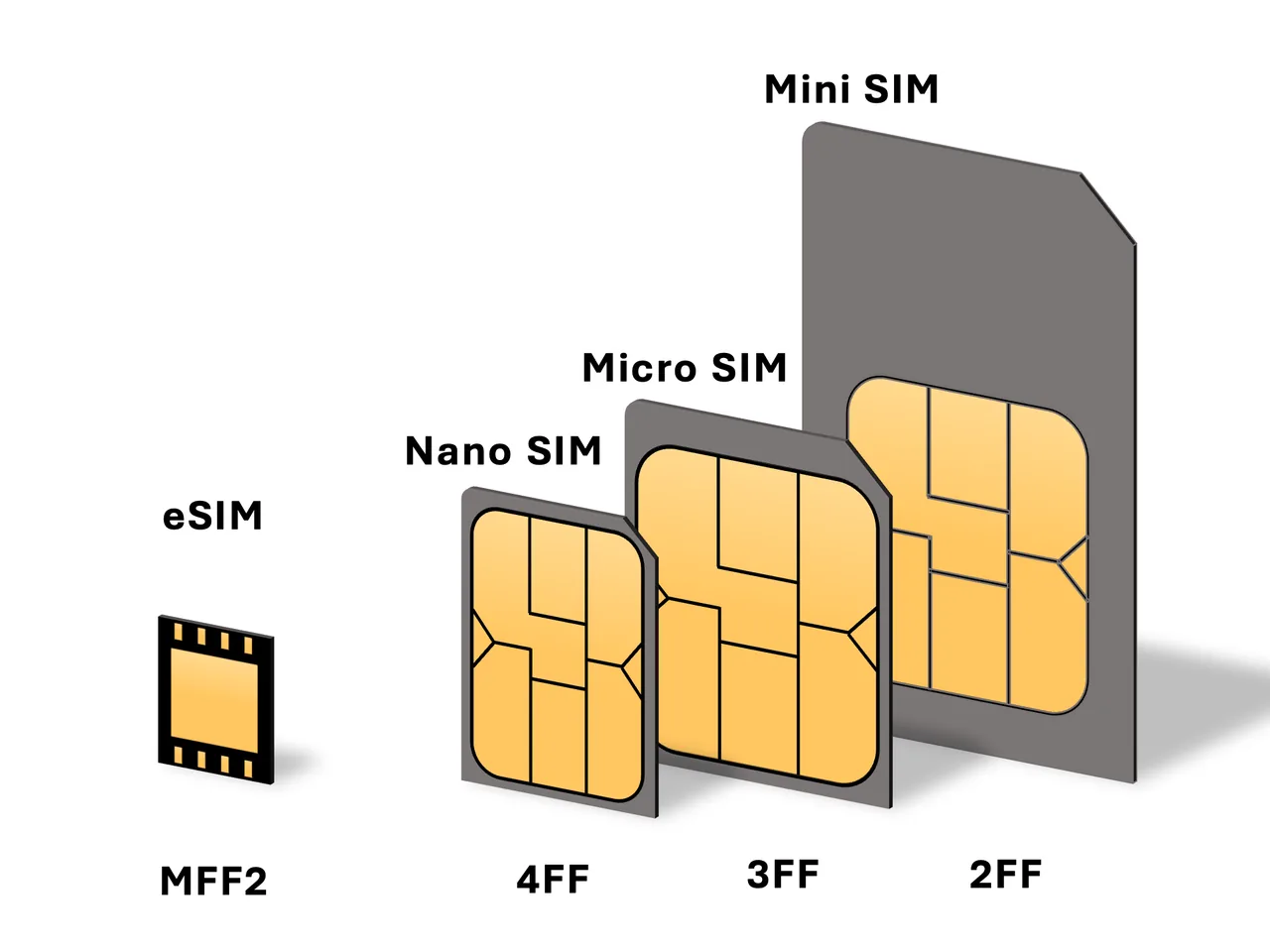
Two conditions before buying anything digital: the phone supports eSIM, and it is carrier-unlocked.
| Handset | eSIM support |
|---|---|
| iPhone | XS, XR, SE (2020) and later |
| Samsung Galaxy | S20 and later, Note 20, Z Fold and Flip, some A-series (A54, A55) |
| Google Pixel | Pixel 3 and later |
Dial *#06#. If an EID appears, the handset takes an eSIM. You can also look for “Add eSIM” in the network settings.
8. How much data you will actually use
Every Singapore plan sells in hundreds of gigabytes, which makes the headline numbers meaningless. Nobody uses 300 GB on a holiday. What follows is a realistic week.
| Activity | Per day | Over a week |
|---|---|---|
| Maps and navigation | 50–150 MB | 0.5–1 GB |
| Messaging with photos | 50–100 MB | about 0.5 GB |
| Grab and food delivery apps | 30–80 MB | 0.3–0.5 GB |
| Search and bookings | 50–100 MB | about 0.5 GB |
| Social feeds and video | 500 MB–2 GB | 4–14 GB |
So the allowance is never the deciding factor in Singapore. Compare validity, calls and regional data instead, because those are the fields that actually differ.
9. Wireless@SG is better than most free WiFi
Singapore’s public network is part of the Smart Nation programme and covers cafés, food centres, malls, libraries, the airport and many attractions. Visitors can use it. If your device is not on a supported plan, you log in through any browser using a mobile number.
It is genuinely good compared with the free WiFi in most cities, and it still does not replace a SIM. The reason is the same everywhere: it works while you are sitting down, and the moments you need data are the ones where you are moving. Finding the right MRT exit, checking whether a hawker stall is open, calling a Grab in the rain.
Treat it as the thing that carries the heavy lifting: downloads, video, uploading photos. Buy a modest data allowance for everything else and the combination costs very little.
10. Installing and switching on
Downloading an eSIM profile needs a connection, so install before you fly rather than in the arrival hall.
On iOS: Settings, then Cellular, then Add eSIM, scan the QR, label the line, set it as the data line, and turn on data roaming for that line. That roaming switch is not your home carrier’s roaming; it tells the phone to use the Singapore line and carries no charge. Then switch data off on the home line.
On Android: Settings, then Network or Connections, then SIMs, add the eSIM, set it as the preferred data SIM and enable roaming on it.
Keep the home line able to receive calls and texts for bank codes, with only its data switched off.
11. What fits which trip
Everything above, arranged by the trip you are taking. Each row points at the product that fits.
| Trip | What to buy | Why |
|---|---|---|
| Three to five days, city only | Yesim 5 GB at $11.52 for 30 days | Under 2 GB a week means it lasts, and there is no counter to visit |
| Adding Johor Bahru, KL or Bali | A physical tourist SIM from S$12 | Regional data is bundled, so one purchase covers the whole trip |
| You want a local number for bookings | Physical tourist SIM | Unlimited local calls and texts. Data-only eSIMs have no number |
| Two weeks or more | Physical SIM, 28–30 day validity | Entry eSIMs run 14 days, and the passport cap is 30 either way |
| Malaysia is the bigger half of the trip | A separate Malaysia eSIM | Cheaper than leaning on a roaming allowance for the whole stay |
| An iPhone bought in mainland China | Physical SIM | Those handsets have no eSIM at all |
| Staying beyond 30 days | Plan on buying a second SIM | A passport-registered SIM is suspended at 30 days and cannot be extended by a visitor |
12. The check before you fly
Six things, and skipping any of them is where the arrival-hall delay comes from.
| When | What |
|---|---|
| Before buying | Dial *#06# for an EID. No EID means no eSIM on that handset |
| Before buying | Decide whether you need a local number. If yes, buy a physical SIM |
| Before buying | Going on to Malaysia or Indonesia? Check the regional allowance rather than the local one |
| Night before | Install the eSIM on home WiFi, without activating it |
| Night before | Pack the passport you will register the SIM against |
| Before boarding | Switch off data on the home line, leaving calls and texts on |
On arrival: airplane mode off, Singapore line set as the data line, roaming enabled on that line. Nothing else.
13. Other Singapore guides worth reading
With connectivity settled, the rest is getting around, sleeping and eating.
| What you are deciding | Guide |
|---|---|
| The trip overall | Singapore travel guide · When to go · What a trip costs |
| Arriving and moving | Changi Airport · MRT and EZ-Link |
| Where to stay | Neighbourhood by neighbourhood · Districts explained |
| What to do | Sentosa · Southern Islands · Hawker centres |